From the original static concept to a finished extension for two platforms.
Not Another Meeting Finished extension
A little friction before another meeting reaches the calendar.
A Chrome extension for Google Calendar and Outlook Web that shows the collective time cost of a meeting and offers practical alternatives before the invitation goes out.
- My role
- Product strategy, UX, interaction design, visual design, testing and development direction
- Development
- Built in close collaboration with a freelance developer
- Timeline
- Two weeks from static concept to finished cross-platform extension
- Platforms
- English-language Google Calendar and Outlook Web
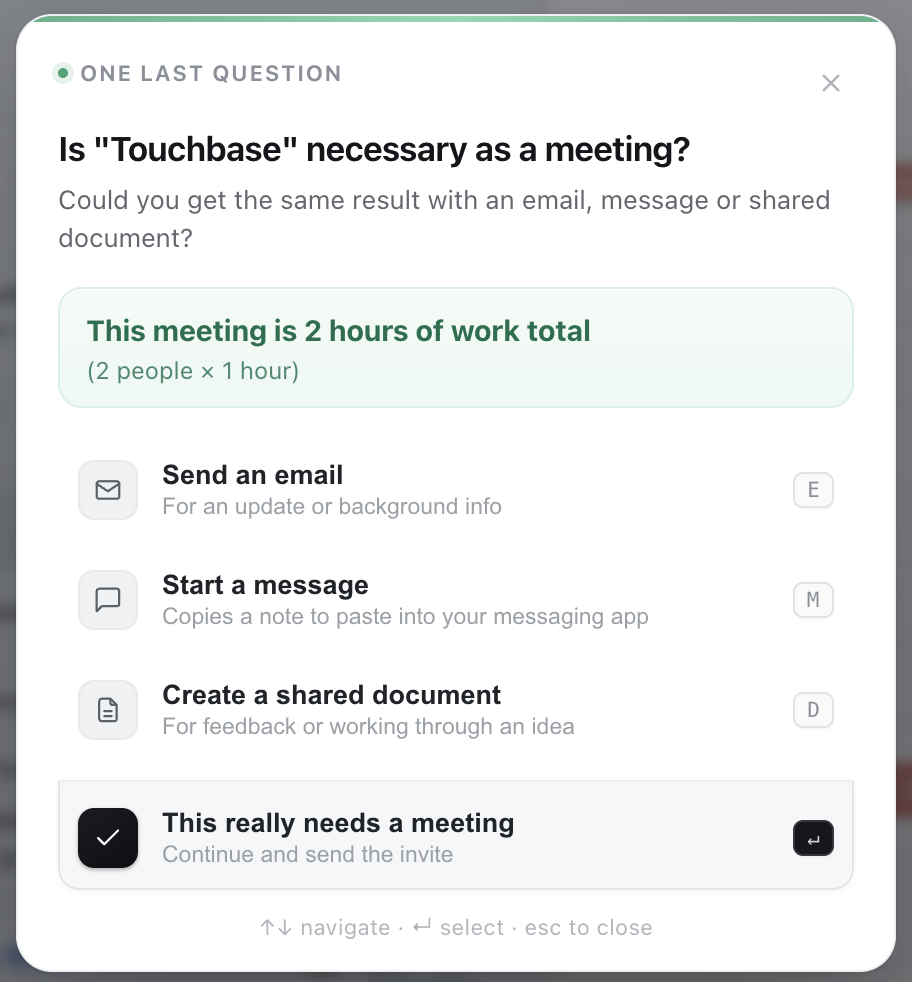
The finished Google Calendar prompt asks one question, makes the collective time visible and lets a necessary meeting continue without another form or approval step.
01 / Overview
Calendar software helps people schedule meetings. It rarely asks whether the meeting is the right tool.
Not Another Meeting catches the invitation at the moment it becomes real, then gives the organizer enough information and a few practical alternatives to reconsider it.
The product is not anti-meeting. Some conversations need to happen live. The goal is to create one useful pause before a meeting is sent, without blocking the organizer or judging the decision.
Participants installed and used the extension in their own calendar workflows.
The source and self-install instructions are available publicly.
Product principle
Add enough friction to make someone think twice. Not enough to piss them off.
The interruption is intentional. The design succeeds when it creates a pause, not when it turns scheduling into paperwork.
02 / The signal
“This could have been an email” had become workplace shorthand.
I kept getting invited to meetings that had little to do with my role or the work I was responsible for. My automatic response was usually some variation of, “What the fuck, another meeting?”
At the same time, LinkedIn and corporate Instagram were full of jokes about unnecessary meetings, with enough reactions and comments to show that the frustration was widely understood.
The memes were not formal research. They were a signal. When the same complaint becomes recognizable workplace shorthand, there is usually a real behavior underneath it.
Could a calendar tool do more than complain about unnecessary meetings after they happened?
The first thing I needed to prove was technical feasibility. I believed a browser extension could intervene inside web-based calendar products without asking a company to replace its existing tools.
03 / From concept to build
The first version looked finished. It did nothing.
I started with a static concept on robrex.space: a polished browser mockup that showed the interruption, the time cost and the alternatives. It made the idea concrete, but it had never touched a real calendar.
I started with Google Calendar because I already had experience modifying Gmail in the browser and expected the products to be similar enough to reach a working test quickly.
I brought a freelance developer the full product direction: the concept, interaction rules, visual references, expected behavior and some early code. The collaboration was a constant back-and-forth through email and chat. I tested each build, documented failures, shared screenshots and console output and directed the next revision.
01Publish the static concept
02Prove the browser interception
03Test real calendar workflows
04Rebuild for two ecosystems
The first working build proved the interception.
It also exposed what still needed work: unreliable duration calculations, incorrect attendee counts and a required second checkpoint that made the experience worse.
04 / Finding the right friction
The product improved when I stopped trying to solve the entire meeting.
The early builds exposed three different problems: the prompt was too abstract, it appeared when the question was irrelevant and an extra required step turned reflection into paperwork.
01
Make the cost concrete
Show the collective time, not another generic warning.
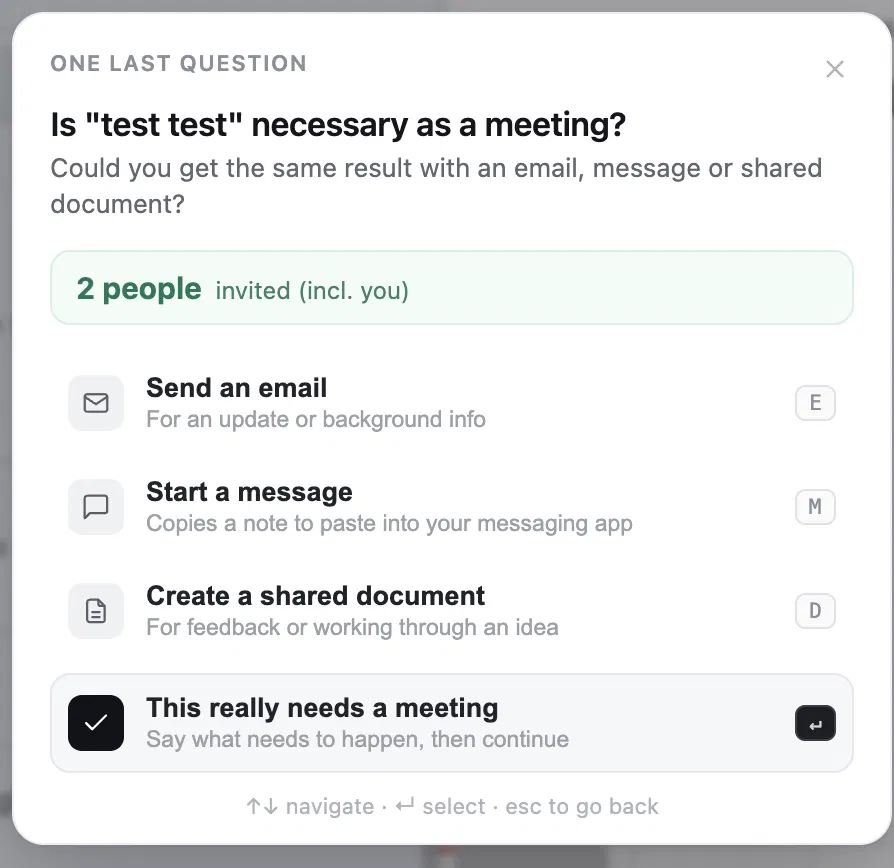
The original 10 participants understood the question, but the prompt became more persuasive when it showed what the organizer was actually committing: the number of people multiplied by the meeting duration.
“This meeting is 6 hours of work total” does more behavioral work than “Are you sure?” because it introduces information the organizer may not have considered.
02
Ask only when the question matters
Editing or canceling a meeting should not restart the debate.
The first working version treated any Save or Send action like a new invitation. When participants changed or canceled an event, the prompt could trigger repeatedly and trap them in a loop that sometimes required closing the browser.
That was not just a technical bug. The interaction model was wrong. Creating a meeting may deserve a checkpoint. Correcting a time, updating details or canceling it does not.
03
Remove the second screen
One checkpoint felt intentional. Two felt like asking permission.
I added a required screen asking what the meeting was supposed to accomplish. The idea was to add useful friction. In practice it was frustrating, unreliable and easy to satisfy with meaningless text.
Removing it clarified the product: this is a meeting-necessity filter, not an agenda tool, meeting coach or approval process.
Question the meeting, then question the organizer again.
The flow tried to improve the meeting after the decision had already been made.
One decision screen. Then get out of the way.
Show the cost, offer alternatives and let a necessary meeting continue in one click.
05 / Two calendar ecosystems
Outlook turned a Google Calendar extension into a cross-platform product.
Google Calendar was enough to prove the concept, but Google Workspace and Microsoft 365 are the two office ecosystems I have encountered most often in corporate work. Supporting only one would leave the product feeling like a platform experiment.
I first tried patching the Google version for Outlook. That became increasingly frustrating because each platform represented the same calendar action through different page structures, labels and behavior.
Outlook treated a private calendar block like an invitation.
The product needed a reliable definition of a meeting: at least one person other than the organizer.
The organizer and attendees could be counted incorrectly.
Google and Outlook expose people differently, so shared arithmetic needed platform-specific detection underneath it.
Outlook alternatives quietly opened Google products.
A technically successful handoff still felt broken when it ignored the ecosystem the user was already in.
Each platform used different language for cancellation flows.
“Don’t Send” in Google and “Discard” in Outlook meant the same thing, but the extension had to understand both.
I eventually revisited the extension from scratch. The design rule was simple: the entire product needed to behave the same way on both platforms. The differences belonged underneath the interface.
Same decision. Different plumbing.
The prompt, collective-time calculation, alternatives and one-click continuation remain consistent. Detection and native handoffs change by platform.
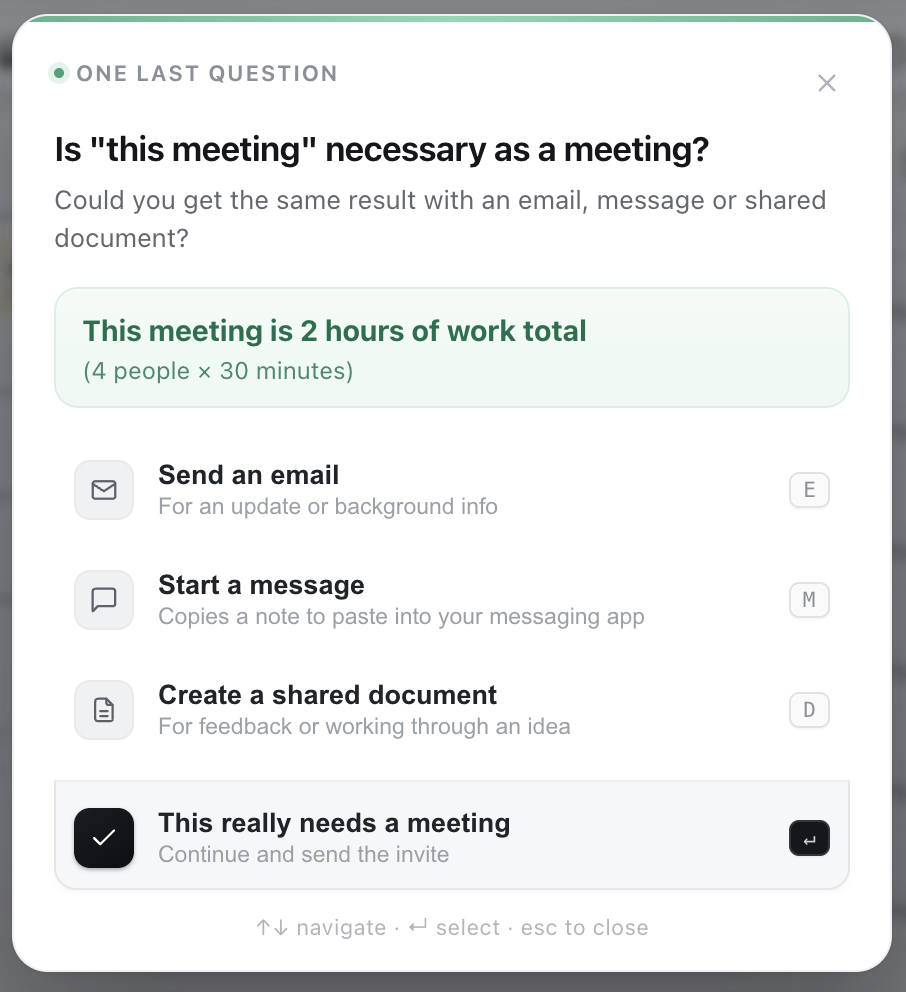
Email and document actions follow the calendar ecosystem: Gmail and Google Docs for Google Calendar, Outlook and Word Online for Outlook Web. Messaging is the exception because Slack often sits alongside either office suite.
I moved that complexity into settings. Google Calendar and Outlook can each use a different messaging default, while the prompt still says one simple thing: Start a message.
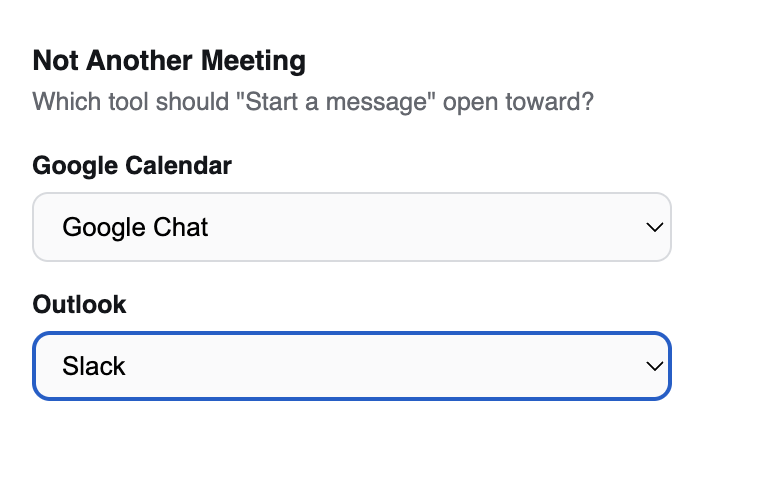
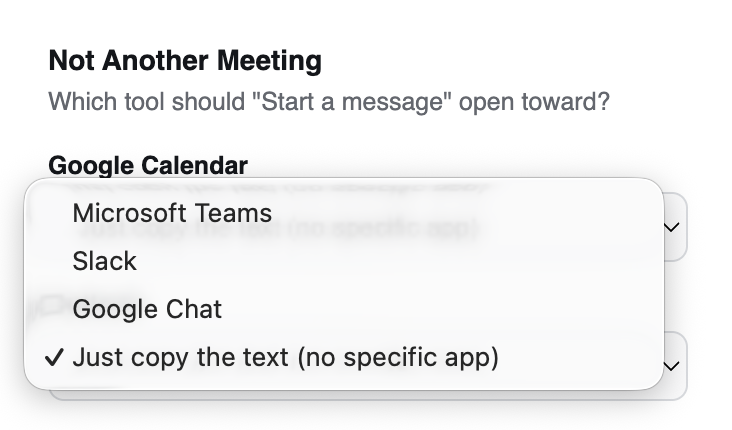
Platform-level settings, not a routing system.
Users can choose different messaging defaults for Google Calendar and Outlook while the meeting prompt stays unchanged and simple.
06 / Testing
Participants used the extension themselves, including the messy parts.
Testing started with 10 people, added two groups of five as the product changed and ended with all 20 using the final build.
The participants came from an existing watch-enthusiast group chat. The shared interest had nothing to do with the product, but the group included a broad range of ages, careers, industries and levels of seniority.
This was an informal convenience sample, not recruited or statistically representative research. Its value was practical: participants installed the extension, created any meeting they wanted, made changes and canceled it. Those ordinary actions exposed failures a scripted happy path would have missed.
Nobody needed an explanation of what the prompt was asking them to reconsider.
The extension did not feel like a ban or an approval process.
Participants saw platform-level settings as useful without wanting more routing complexity.
The collective-time statement created the pause and did most of the behavioral work without another form.
The simplified one-screen flow felt focused. The removed outcome screen had felt like paperwork.
Participants wanted the decision to feel the same even when the calendar and connected tools changed underneath it.
Platform-level messaging was enough. Account, client or calendar-specific routing was not justified.
The extension made sense as a necessity filter, not as meeting scoring, agenda generation or management software.
“Platform-level is enough. Do not turn this into a routing system.”
07 / Privacy and scope
A workplace tool should not quietly become a workplace surveillance tool.
Because the extension is intended for corporate environments, privacy had to be part of the product definition rather than a policy added later.
Everything happens locally inside the browser tab the organizer is already using. The extension does not store the meeting title, attendees, time or which option the organizer chooses. Nothing about the meeting is sent to a separate service or saved for reporting.
Support one private decision.
Read enough of the open event to calculate collective time and route the selected alternative, then get out of the way.
Scorecards, dashboards and judgment.
No saved reasons, employee scores, manager reports, behavioral analytics or automated verdicts about whether someone chose correctly.
I also avoided rebuilding functions that Google, Microsoft, Slack and Teams already handle. The extension does not need its own email composer, chat system, document editor or meeting-management layer. It intervenes at the decision point, then hands the work to the tool already in use.
Known boundaries
The current extension is built for English-language Google Calendar and Outlook Web. It has not been validated across every delegated-calendar setup, localized interface, managed Microsoft environment or self-hosted Exchange configuration. The core product is finished; those are environment and compatibility limits, not missing product features.
08 / Outcome
The extension now does the small job it was designed to do.
The finished product intercepts a new meeting invitation, shows the total collective time, offers email, message or shared document as working alternatives and lets a necessary meeting continue immediately.
Solo calendar blocks do not trigger it. Changes and cancellations are not second-guessed. Google Calendar and Outlook Web behave consistently while handing actions to the appropriate native tools underneath.
The final visual pass did not add behavior. It made the working product feel finished rather than like an alpha or student exercise.
Current status
Finished, public and self-installed through GitHub.
The complete source code and installation instructions are available for anyone who wants to use or test it. GitHub is the only distribution point.
Finished does not mean maintenance-free
The extension lives inside two products I do not control. Google or Microsoft can change a button label, page structure or interaction and break it. That does not make the current product unfinished. It makes it a browser extension.
09 / Reflection
The best version came from subtracting.
Simple worked best. I started with everything and whittled it down.
The early direction tried to question the meeting, improve its outcome, understand every calendar action and solve communication after the decision. Each addition seemed defensible by itself. Together, they made the product frustrating and unfocused.
The final experience is one checkpoint, one concrete cost, three practical alternatives and one click to continue.
To quote The Birdcage: “Don’t add. Just subtract.”
The product became better when it stopped trying to manage meetings and focused on one question: does this need to be a meeting at all?